
SOLO Server Customer License Portal
The Customer License Portal improves your professional image by providing customers with easy ways to buy from you and manage their software licenses with various options. The self-service functionality is convenient for customers, and also results in less work for your sales and support team.
Here are screenshots of the default portal, which can be customized to match the look and feel of your website:

Default/generic Customer License Portal

Custom branded Customer License Portal
Since we use SOLO Server for our own customers, we have our branded version of the Customer License Portal below, which our customers can access by clicking on the Login / Download & Renew Software menu at the top of our website.
As a SOLO Server author, you can easily provide this same functionality and custom branding to your own customers. You can learn about how to do this by viewing the Customer License Portal manual topics.
Customer License Portal Features
You can choose which of the following features are made available to your customers:
Payment History
Allows the customer to review past payments and re-print receipts and invoices. If you are not using SOLO Server's integrated e-Commerce, you can disable this option.

Licenses & Activations
The customer can view their licenses, installation history, and other license related information you want to display. You can define the number of computers on which a license can be activated, which are the Activations Left. Each activated computer is assigned a unique Installation ID.


You can give customers the option view and manage their installations, including the ability to remotely deactivate an installation, which increments the Activation Left count so it can be used on another machine. This is especially useful if a computer crashed or was formatted and the customer can no longer initiate the deactivation directly through your software.

If using our Cloud-Controlled Network Floating License feature, your customers can view usage reports and view and/or manage their currently active sessions in the Customer License Portal.
When using Protection PLUS 5 SDK with custom parameter sets, the custom license data is displayed in the Portal so customers can see the custom entitlements that are configured for their particular license.
Customer can also be given the option to process a manual/offline activation through the Customer License Portal, which allows them to activate a disconnected device as long as they can access a web browser through another computer.
Downloads
The availability of downloads are based on the licenses the customer purchased. Access to a download can also be based upon an expiration date, which can either be the expiration date of the license, or it can just be a maintenance/support expiration date.

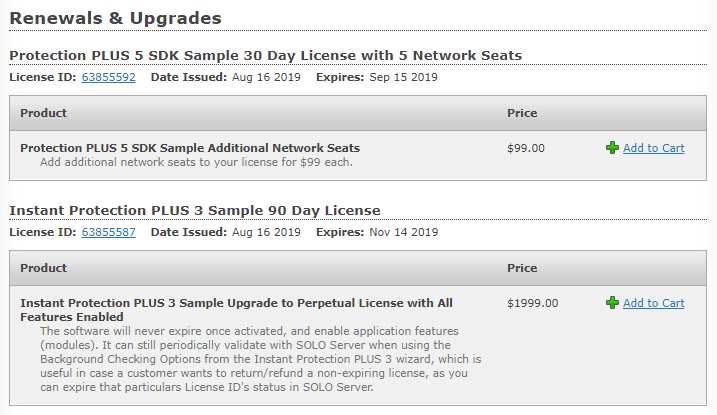
Renewals & Upgrades
When using SOLO Server's integrated e-Commerce, license renewals and upgrades can be offered to existing customers based on the licenses they already have. A customer can renew their original license subscription and does not need to purchase and activate with a new one. You can define what requirements need to be met for a renewal or upgrade to be available, such as not allowing the customer to purchase a renewal if their license has been expired for more than 30 days.
Recurring Payments
When using SOLO Server's integrated e-Commerce and a compatible payment gateway, you can process automatically recurring payments, such as for a subscription license. With each successful payment, the subscription will be renewed, and the software will continue to run. If a payment fails, you can configure when the software will stop working. SOLO Server can also automatically send an email to the customer letting them know if their credit card is about to expire and needs to be updated. Customers can use the Portal to update their credit card information or cancel their subscription.

Product Registration
The customer can register licenses purchased through authorized retailers or distributors, which adds the license(s) to their customer account.
