Open topic with navigation
Using the Debugging Dialog
The debugging dialog makes it easy to test the licensing features in your protected application. To enable the debugging dialog, on the wizard step check the setting "Include debug features" and wrap your application. When you launch your protected application, a dialog will pop up allowing you to adjust some of the current settings in the license in order to easily test features.
Make sure to uncheck the "Include debug features" and re-wrap your application before releasing it.
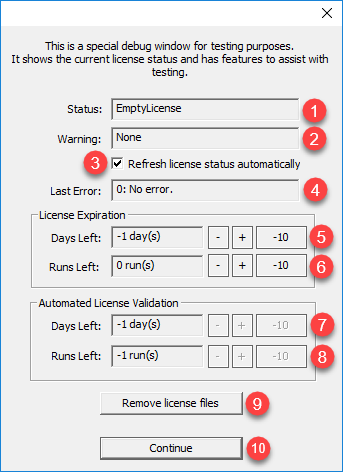
- Status: The current status of the license.
- Warning: This field may show one of the following license warnings:
- PeriodicRunsAboutToExpire (how many application runs left before a lock-out)
- PeriodicDaysAboutToExpire (how many days left before a lock-out)
- SubscriptionAboutToExpire (how many days left before a subscription expiration)
- Refresh license status automatically: If checked, the licensing logic will reload and re-validate the local license after any changes made using the Debug Dialog. This does not refresh the license with SOLO Server Automation.
- Last Error: Any error when opening and validating the license. Refer to the for more information.
- License Expiration Days Left: For evaluation and subscription licenses this will display the current days left before expiration and allow modifying the days left. A value of -1 will be displayed if this feature is disabled. Click the "+" or "-" keys to modify the value by one day. Click the "-10" button to subtract ten days.
- License Expiration Runs Left: For evaluation and subscription licenses this will display the current runs left (or -1 if not applicable) before expiration and allow modifying the runs left. A value of -1 will be displayed if this feature is disabled. Click the "+" or "-" keys to modify the value by one run. Click the "-10" button to subtract ten days.
- Automated License Validation Days Left: If using the Automated License Validation and "Require validation" is checked in the AutoCrypt SL wizard, this will display and allow modification of the current days until the next validation check. A value of -1 will be displayed if this feature is disabled. Click the "+" or "-" keys to modify the value by one day. Click the "-10" button to subtract ten days.
- Automated License Validation Runs Left: If using the Automated License Validation and "Require validation" is checked in the AutoCrypt SL wizard, this will display and allow modification of the current runs until the next required validation check. A value of -1 will be displayed if this feature is disabled. Click the "+" or "-" keys to modify the value by one run. Click the "-10" button to subtract ten days.
- Remove license files: Clean all license files from the system. This allows the licensing to be reset so that it functions as if it was run for the first time on a clean system.
- Continue: Exit the debug dialog and run the protected application.