

If you’re already using SOLO Server’s integrated eCommerce, Stripe gives you a modern payment option backed by one of the largest payment networks in the world. If you’re a SOLO Server customer who hasn’t enabled integrated eCommerce yet, Stripe’s arrival is a good reason to take another look. We’ll cover both scenarios below.
Why Choose Integrated eCommerce
If you’re a SOLO Server customer who handles payment processing separately from licensing, for example taking payments through your website or a separate eCommerce platform and then issuing licenses manually or through a custom integration, the Stripe addition is a good moment to revisit whether integrated eCommerce makes sense for you.
The pitch is simple: when payment, license generation, fulfillment emails, the Customer License Portal, and renewal workflows all live in one system, you stop maintaining the glue code between them. The customer pays and the license is delivered, end to end, inside SOLO Server.
A Modern, On-Page Checkout Experience
With Stripe, customers complete payment directly inside the SOLO Server shopping cart. They enter payment details, click pay, and the transaction completes on your storefront. For authors currently using PayPal Standard, where customers are redirected to PayPal to complete payment, this is a step forward in checkout experience.
The checkout is built on Stripe Payment Element, Stripe’s modern embedded payment UI. It automatically displays the right payment methods for each customer based on their location, currency, device, and browser, including digital wallets like Apple Pay and Google Pay where available. You control which payment methods are enabled from your Stripe Dashboard, so you can offer as many or as few as makes sense for your business. Customers will still automatically be emailed their order confirmation and license details, just like any other purchase through SOLO Server.
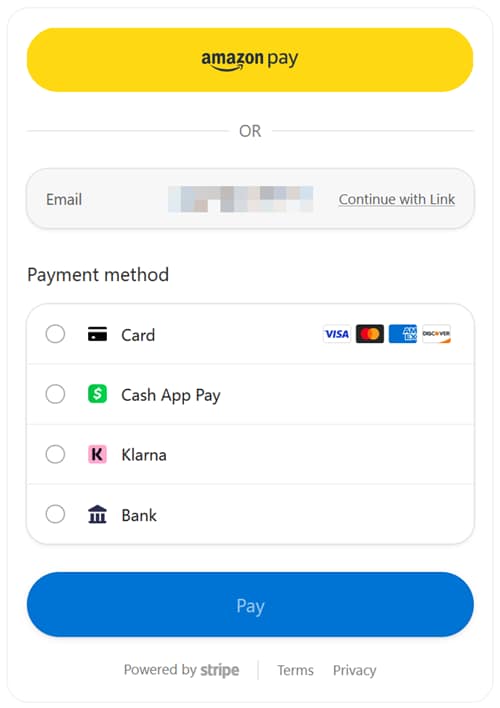
Payment Element also stays current. As Stripe adds new payment methods, ships new fraud protections, or rolls out checkout improvements, Payment Element picks them up without requiring SoftwareKey to change anything on our end. Every Stripe account also includes Stripe Radar, Stripe’s built-in fraud detection, which screens transactions against signals from Stripe’s global payment network at no additional cost. Your checkout keeps getting better without you having to do anything.
The SOLO Server shopping cart and Customer License Portal can also be customized with your own design template to match the look and feel of your website, and SoftwareKey support can assist with setting up your custom markup if you’d like a hand.
What Setup Looks Like
For SOLO Server Shared URL customers, SoftwareKey can onboard you through our Stripe Partner Connect platform.
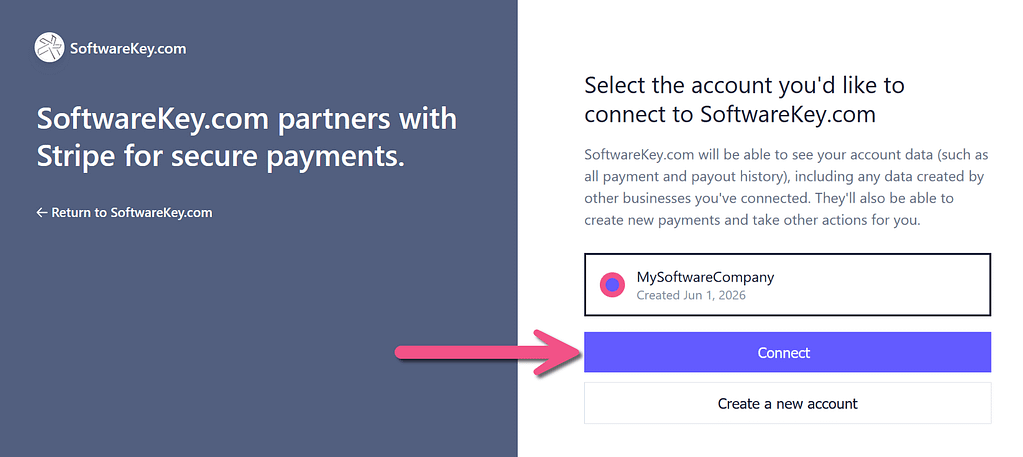
For SOLO Server Dedicated URL customers, the full step-by-step walkthrough, including the exact permission settings, the secure-transmission process, and how to start with test transactions before going live, is in the SOLO Server author manual.
A Few Things Worth Knowing Up Front
- One-time payments only at launch. The initial Stripe integration supports one-time purchases, including new licenses, upgrades, and renewals processed as discrete transactions. Automatic recurring billing through SOLO Server’s payment plans feature is on the roadmap for a future release. If recurring billing is central to your business model today, that timing is worth discussing with us first.
- PayPal isn’t going anywhere. Adding Stripe doesn’t deprecate PayPal. Authors who prefer PayPal, or whose customers prefer it, can continue using it. The choice of payment processor stays yours.
- SoftwareKey’s eCommerce fees are unchanged. Moving to Stripe doesn’t change the fee structure on the SoftwareKey side. Stripe’s own processing fees apply at the Stripe layer and are set by Stripe, independent of what you pay us.
Next Steps
If you want to enable Stripe on your storefront, you have two paths:
- For most customers, you can request to connect a new or existing Stripe account.
- Contact us if you’d like help evaluating whether Stripe is right for your business or planning a migration from PayPal Standard.
For existing customers who haven’t started using our integrated eCommerce yet, the same offer applies. Reach out and we’ll walk you through what it would look like for your storefront, with Stripe as a starting point rather than something to migrate to later.
The bigger picture: SOLO Server’s eCommerce is meant to be the part of your software business you don’t have to think about. Stripe’s addition makes that promise meaningfully stronger, and it opens up a customer experience that competes with anything else out there.