

We're happy to announce that SOLO Server Automation now supports real-time, location-based tax calculation through a new integration with Avalara Avatax!
With more states requiring the collection of sales tax for online sales and the complex requirements this entails, SOLO Server's built-in, simplified sales tax engine is not sufficient for tax compliance. To address this, we are happy to announce we have partnered with Avalara, a leading provider of sales tax solutions, to integrate SOLO Server with their AvaTax solution for real-time location-based tax calculation accurate to the street level for US addresses!
Currently, the following features are supported:
With more states requiring the collection of sales tax for online sales and the complex requirements this entails, SOLO Server's built-in, simplified sales tax engine is not sufficient for tax compliance. To address this, we are happy to announce we have partnered with Avalara, a leading provider of sales tax solutions, to integrate SOLO Server with their AvaTax solution for real-time location-based tax calculation accurate to the street level for US addresses!
Currently, the following features are supported:
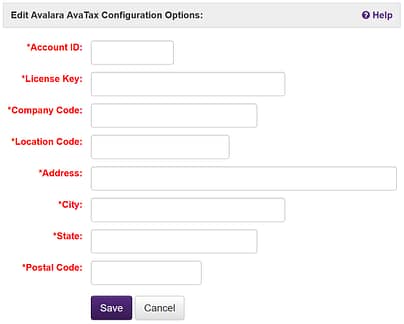
- A new page in the administration interface to configure the integration with AvaTax and test and verify successful connectivity and authentication.
- Address resolution/validation in the shopping cart checkout which will detect any potential errors in the customer and shipping addresses and offer the customer any suggested corrections to ensure the most accurate data is used to calculate tax.
- Real-time location-based tax calculation on a line-item basis, including support for shipping.
- Upon placing an order, automatic submission and commit of the transaction to AvaTax.
- Support for voiding and refunding Avalara transactions.
- Support for the following refund types:
- Full
- Percentage
- Tax Only
- Itemized
Getting started is straightforward:
- Sign up for an Avalara Avatax account
- Once you have an account, in SOLO Server, visit the Avalara Settings page and enter your account and tax address details. Click the Test Connection button to verify account authentication with Avalara.
- Next, configure your shopping cart to use Avalara for calculating sales tax by setting the Tax Calculation Type cart option to Avalara.
- Finally, in Avalara, map your SOLO Server Product Option IDs to tax codes.
- Detailed instructions can be found in the manual
As always we'd love to hear from you so feel free to reach out and contact us with your questions and feedback.